| Result | -- |
|---|---|
| In Decimal DEC | -- |
Dealing with numbers in everyday life feels natural because everyone learns to count on ten fingers. However, modern computing, engineering, and historical measurement frameworks rely heavily on alternative counting setups. This interactive platform simplifies the tedious task of switching between different systems, allowing anyone to compute equations containing mixed positional notations or massive exponential terms without breaking a sweat.

The interface is divided into two distinct operating modes designed for specific mathematical problems. Switching between them is handled via the navigation buttons at the top of the application container. The layout automatically adapts to show the relevant input fields, control sliders, and specialized result rows depending on the chosen path.
Mode 1: Mixed Bases Arithmetic
The first option is ideal when dealing with a combination of numbers written in different bases. For instance, a single equation might include a binary string, a hexadecimal value, and an octal digit all added together. To operate this mode successfully, observe the following steps:
- Locate the main input field under the Mixed Bases tab. A default expression is already provided to demonstrate the correct syntax.
- Type your mathematical expression using standard symbols for addition, subtraction, multiplication, and division.
- Specify the base of each individual number by placing the base value inside square brackets immediately after the digits. For example, a binary value must be written with a trailing indicator like 11010[2], while a hexadecimal string requires a sixteen indicator such as B5[16].
- Utilize the quick badge buttons underneath the input field to quickly append common base tags like binary, octal, decimal, or hexadecimal to your current cursor position.
- Adjust the Target Base slider or input field at the bottom to define the format of your final output. If you want the total answer displayed in base five, simply shift the slider to five.
- Click the Calculate button to process the entire string, generate the step-by-step breakdown, and refresh the visual density map.
Mode 2: Power Expressions and Bit Breakdown
The second option targets algebraic terms that involve large exponents, a frequent occurrence in computer science exams and academic problem sets. This mode is specifically engineered to handle massive integers without encountering rounding errors. To run a power analysis, follow this workflow:
- Select the Power Expressions tab to reveal the dedicated formula input line.
- Enter your formula using the caret symbol for exponents. For example, a formula representing a classic power expression would look like 4^x + 2^32 – 9.
- Set the value of the variable x using the independent exponent slider or the adjacent numeric box. The application will instantly substitute this value into the expression.
- Define your target base. For most examination problems, this is left at base two because teachers love asking for the total number of ones or zeros in a binary representation.
- Examine the results table. In this mode, two extra rows appear automatically to display the exact count of high and low bits in the converted result.
Table of Contents
Understanding the Visual Features and Interactive Outputs
Beyond basic numerical answers, this tool provides visual feedback to help users grasp how digits are distributed across the resulting string. Once the calculation concludes successfully, three separate sections update on the screen.
The Results Table displays the finalized answer converted directly into your selected target base, complete with a subscript label indicating the notation system. Directly below that, the absolute value is displayed in standard decimal format so you can easily compare the magnitude against familiar real-world values.
The Digit Map canvas acts as a visual density chart. It takes the final string and maps the individual characters into a grid of colored tiles. When analyzing binary outputs, the grid uses a distinct green shade for ones and a light gray for zeros, making it incredibly easy to spot patterns, clusters, or repetitive sequences. For higher bases, the intensity of the blue shading reflects the relative value of the digit, where higher characters like F or Z appear significantly darker than lower units like one or two. This chart reads from left to right and top to bottom, moving from the most significant digit down to the least significant one.
The Step-by-Step Solution accordion reveals the inner mechanics of the calculation. It acts as an educational companion, breaking down every single alternative base notation into a clear polynomial expansion before demonstrating how the numbers look in base ten. This transparent process ensures that students can cross-check their manual homework calculations against the software logic to discover exactly where a human arithmetic error occurred.
The Real-World Logic of Alternative Bases
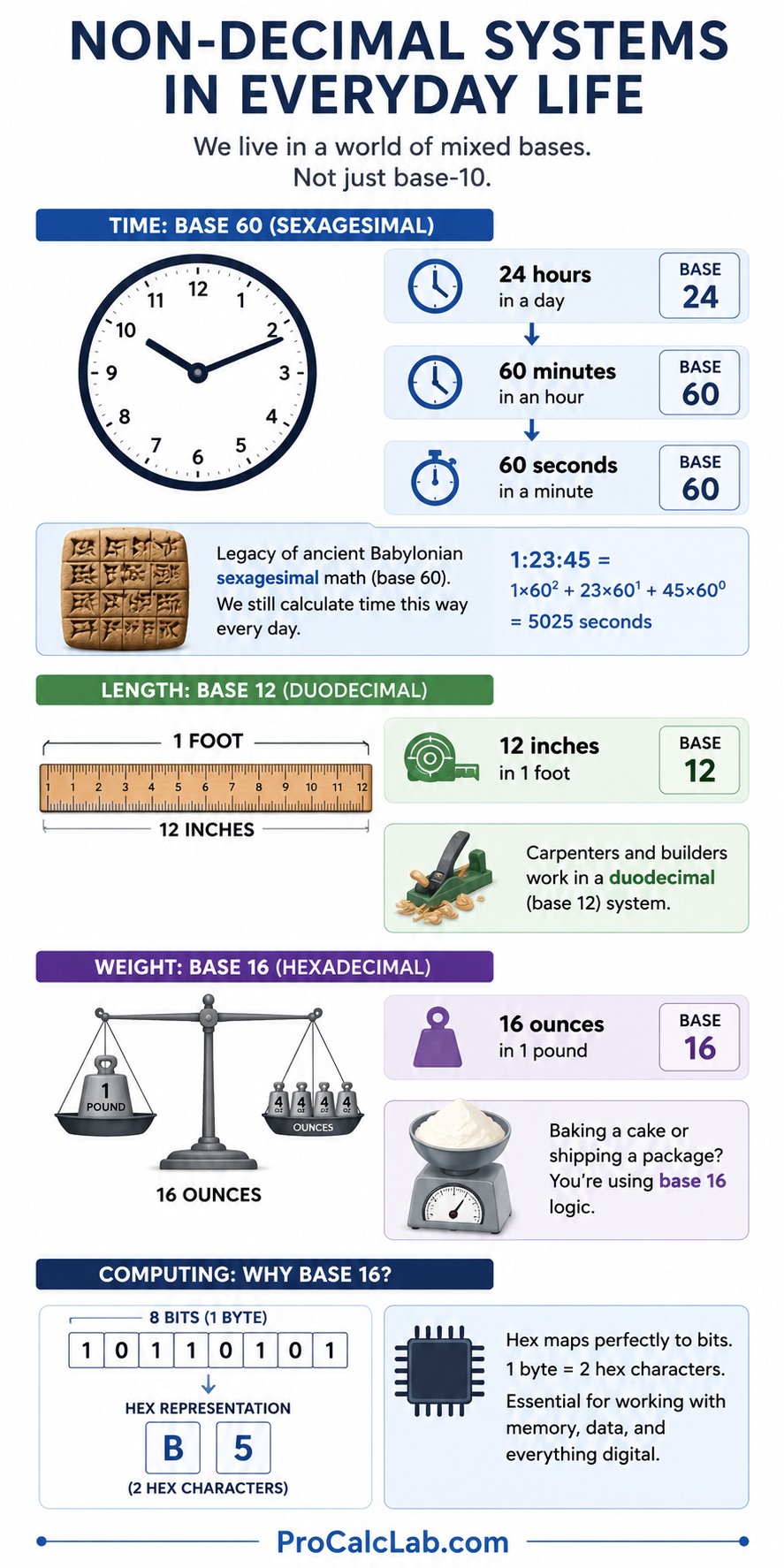
It is a common misconception that non-decimal counting belongs exclusively to computer microchips. Human history is packed with alternative base systems that people still use daily without recognizing them. The most prominent example is found throughout the US customary and British Imperial measurement frameworks.
Consider how time is kept. A day is divided into twenty-four hours, an hour contains sixty minutes, and a minute spans sixty seconds. This is a direct legacy of ancient Babylonian sexagesimal math, which utilized base sixty. When someone calculates durations, they are manually performing mixed-base calculations that closely mimic the behavior of this software tool.
The Imperial system provides excellent parallel examples of base twelve and base sixteen architectures. Look at linear measurements where twelve inches constitute a single foot. This structure means that a carpenter measuring a piece of timber is working within a duodecimal framework, also known as base twelve. Similarly, weight distribution relies on sixteen ounces to build a single pound. This means anyone baking a cake or shipping a package in the United States is dealing with a real-world application of hexadecimal logic, which is base sixteen.
When software engineers work with computer memory, they use base sixteen because it maps perfectly to eight-bit storage blocks. A single byte can be represented cleanly by two hexadecimal characters. Therefore, learning to convert these values is not just an abstract exercises, it is an essential skill for managing structural data across physical boundaries, whether those boundaries are silicon wafers or architectural blue prints.
Practical Examples: Converting Imperial Groupings
To demonstrate the mathematical reality behind these systems, let us analyze how a mixed expression translates into standard decimal numbers using the exact positional rules embedded in the calculator logic. Imagine an architectural plan listing structural components in mixed units. Suppose an engineer needs to combine a set of historical measurements where one dimension is written as 57 in base twelve because it represents a total of feet and inches, and another part is recorded as 2E in base sixteen because it denotes an ounce-to-pound calculation. The equation looks like this:
Expression: 5712 + 2E16
To solve this, the calculator takes each component and breaks it down by multiplying each digit by the base raised to its positional power. Digits are ordered from right to left, starting at position zero.
First, analyze the duodecimal number 5712:
The digit 7 sits in position zero, meaning it is multiplied by twelve to the power of zero. The digit 5 occupies position one, meaning it is multiplied by twelve to the power of one. The formula expands smoothly:
Value = 5 · 121 + 7 · 120
Value = 60 + 7 = 67
Next, analyze the hexadecimal number 2E16. In base sixteen, alphabetic letters replace values beyond nine. Here, the letter A equals ten, B equals eleven, C equals twelve, D equals thirteen, and E represents fourteen. The digit E is at position zero, and the digit 2 is at position one. The expansion proceeds accordingly:
Value = 2 · 161 + 14 · 160
Value = 32 + 14 = 46
Now, combine the decimal equivalents to find the total sum in standard base ten:
Total = 67 + 46 = 113
If the target base is set to binary, the calculator will take the decimal total of 113 and repeatedly divide it by two, tracking the remainders from bottom to top to assemble the final string. Let us perform that sequence:
113 ÷ 2 = 56 with a remainder of 1
56 ÷ 2 = 28 with a remainder of 0
28 ÷ 2 = 14 with a remainder of 0
14 ÷ 2 = 7 with a remainder of 0
7 ÷ 2 = 3 with a remainder of 1
3 ÷ 2 = 1 with a remainder of 1
1 ÷ 2 = 0 with a remainder of 1
Reading the remainders upward yields the final binary string: 11100012. This matches the exact step-by-step logic our online system generates instantaneously.
Comprehensive Base Equivalence Reference Tables
The following reference tables illustrate how values progress across the most frequently encountered base systems. Use these charts to quickly verify individual digit conversions when constructing expressions manually.
Computing Systems Comparison
| Decimal Base 10 | Binary Base 2 | Hexadecimal Base 16 |
|---|---|---|
| 0 | 0 | 0 |
| 1 | 1 | 1 |
| 2 | 10 | 2 |
| 3 | 11 | 3 |
| 4 | 100 | 4 |
| 5 | 101 | 5 |
| 6 | 110 | 6 |
| 7 | 111 | 7 |
| 8 | 1000 | 8 |
| 9 | 1001 | 9 |
| 10 | 1010 | A |
| 11 | 1011 | B |
| 12 | 1100 | C |
| 13 | 1101 | D |
| 14 | 1110 | E |
| 15 | 1111 | F |
| 16 | 10000 | 10 |
| 17 | 10001 | 11 |
| 18 | 10010 | 12 |
| 19 | 10011 | 13 |
| 20 | 10100 | 14 |
| 21 | 10101 | 15 |
| 22 | 10110 | 16 |
| 23 | 10111 | 17 |
| 24 | 11000 | 18 |
| 25 | 11001 | 19 |
| 26 | 11010 | 1A |
| 27 | 11011 | 1B |
| 28 | 11100 | 1C |
| 29 | 11101 | 1D |
| 30 | 11110 | 1E |
| 31 | 11111 | 1F |
| 32 | 100000 | 20 |
Alternative and Historical Bases Comparison
| Decimal Base 10 | Octal Base 8 | Duodecimal Base 12 |
|---|---|---|
| 0 | 0 | 0 |
| 1 | 1 | 1 |
| 2 | 2 | 2 |
| 3 | 3 | 3 |
| 4 | 4 | 4 |
| 5 | 5 | 5 |
| 6 | 6 | 6 |
| 7 | 7 | 7 |
| 8 | 10 | 8 |
| 9 | 11 | 9 |
| 10 | 12 | A |
| 11 | 13 | B |
| 12 | 14 | 10 |
| 13 | 15 | 11 |
| 14 | 16 | 12 |
| 15 | 17 | 13 |
| 16 | 20 | 14 |
| 17 | 21 | 15 |
| 18 | 22 | 16 |
| 19 | 23 | 17 |
| 20 | 24 | 18 |
| 21 | 25 | 19 |
| 22 | 26 | 1A |
| 23 | 27 | 1B |
| 24 | 30 | 20 |
| 25 | 31 | 21 |
| 26 | 32 | 22 |
| 27 | 33 | 23 |
| 28 | 34 | 24 |
| 29 | 35 | 25 |
| 30 | 36 | 26 |
| 31 | 37 | 27 |
| 32 | 40 | 28 |
Troubleshooting Mistakes in Manual Input
Computers strictly process what is provided, meaning slight typos will halt calculations or throw warnings inside the error message panel. If the application states that your input is invalid, check for these common user oversights:
- Character mismatch: Every base possesses a specific limit on permissible characters. Binary only tolerates zeroes and ones. Octal allows digits ranging from zero to seven. Decimal spans zero to nine. Hexadecimal permits zero through nine alongside letters A through F. If you accidentally write 84[8] or G1[16], the processing script will instantly reject the expression because eight does not exist in octal, and G is outside the hexadecimal alphabet.
- Syntax spacing: Ensure that base indicators are wrapped tightly within square brackets immediately following the associated value. Avoid adding empty spaces between the final digit and the starting bracket since the parsing engine relies on regular expressions that look for strict continuous strings.
- Operator clarity: Remember to include explicit mathematical operators like plus, minus, asterisk, or forward slash between independent base terms. Writing two base terms back-to-back without an operator will cause a script engine crash.
Literature
- Knuth, Donald E. The Art of Computer Programming, Volume 2: Seminumerical Algorithms. Addison-Wesley Professional, 1997.
- Petzold, Charles. Code: The Hidden Language of Computer Hardware and Software. Microsoft Press, 2000.
- Ascher, Marcia. Ethnomathematics: A Multicultural View of Mathematical Ideas. Chapman and Hall/CRC, 1991.
- Gridgeman, Norman T. Base Systems and Historical Weights and Measures frameworks. Technological Review Journals, 1973.

Markus Fletcher — Structural Design Specialist
Expert in structural integrity, 3D modeling, and applied mathematics. Markus focuses on creating precise tools for construction professionals and DIY engineers.