| Composition | HEX | Ratio |
|---|
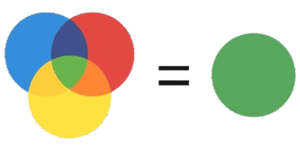
Quickly mix colors and preview the result before you start painting. This tool lets you combine up to three tint colors and a base, set exact proportions, and see the resulting shade in real time. Ideal for DIY projects, small repairs, crafts and visual planning — no color theory degree required.


Table of Contents
What this tool does
- Combine up to three colors plus a base (primer/white) and preview the mixed shade.
- Enter colors as HEX codes, pick them with the color picker, or use the quick swatches.
- Adjust proportions (percentages) to control how much of each color goes into the mix.
- See the final color swatch and copy the HEX code for further use.
How to use
- Pick a color — use the color picker or type a HEX code (e.g. #FF0000).
- Assign it to one of the slots (Color 1, Color 2, Color 3, Base) using the selector.
- Set proportions — enter percentages for each color. The tool will use these to calculate the final blend.
- Mix — press the Mix button to generate the result. The mixed swatch and HEX code display instantly.
- Adjust the ratios and re-mix until you’re happy with the shade. Use Reset to start over.
Examples
Warm pink: Color 1 = bright red, Color 2 = white, small amount of Color 3 = yellow. Increase white for a paler pink.
Soft green: Color 1 = sea green, Color 2 = white, Color 3 = tiny bit of blue — reduce the blue if too cool.
- Start small: test with small batches before mixing large quantities.
- Record ratios: save or note the final HEX and the exact percentage mix so you can reproduce the color later.
- Adjust gradually: adding a tiny amount of a dark color changes the shade more than you might expect.
- Use the base: adding white or a base lightens the color and reduces saturation; use it to fine-tune pastel tones.
- Screen vs paint: monitor colors may differ from real paint — always test on a small patch and let it dry before final decisions.

After mixing, copy the displayed HEX code or take a screenshot. Save the mix ratios if you want to reproduce the color exactly later.
Popular Colors & Suggested Mixing Recipes
| Color | Swatch | HEX | Suggested mix |
|---|---|---|---|
| Pure Red | #FF0000 | Red 100% | |
| Crimson | #DC143C | Red 85% + Magenta 10% + Black 5% | |
| Scarlet | #FF2400 | Red 90% + Orange 10% | |
| Firebrick | #B22222 | Red 70% + Brown 20% + Black 10% | |
| Tomato | #FF6347 | Red 75% + Orange 15% + White 10% | |
| Coral | #FF6B61 | Red 60% + Orange 30% + White 10% | |
| Salmon | #FA8072 | Red 50% + White 40% + Yellow 10% | |
| Pink | #FFC0CB | Red 30% + White 70% | |
| Hot Pink | #FF69B4 | Magenta 70% + Red 20% + White 10% | |
| Magenta / Fuchsia | #FF00FF | Red 50% + Blue 50% | |
| Rose | #FF007F | Red 70% + Magenta 20% + White 10% | |
| Orange | #FFA500 | Yellow 60% + Red 40% | |
| Dark Orange | #FF8C00 | Orange 80% + Red 20% | |
| Amber | #FFBF00 | Yellow 70% + Orange 30% | |
| Gold | #FFD700 | Yellow 80% + Brown 10% + Orange 10% | |
| Peach | #FFDAB9 | Yellow 40% + Red 20% + White 40% | |
| Apricot | #FBCEB1 | Orange 50% + White 40% + Red 10% | |
| Yellow | #FFFF00 | Yellow 100% | |
| Lemon | #FFF700 | Yellow 90% + White 10% | |
| Mustard | #FFDB58 | Yellow 70% + Brown 20% + Red 10% | |
| Khaki | #F0E68C | Yellow 60% + White 30% + Brown 10% | |
| Lime | #00FF00 | Green 100% | |
| Chartreuse | #7FFF00 | Yellow 60% + Green 40% | |
| Green | #008000 | Green 100% | |
| Forest Green | #228B22 | Green 80% + Black 10% + Yellow 10% | |
| Mint | #98FF98 | Green 50% + White 45% + Cyan 5% | |
| Sea Green | #2E8B57 | Green 70% + Blue 20% + White 10% | |
| Sage | #B2AC88 | Green 40% + Gray 30% + White 30% | |
| Olive | #808000 | Yellow 60% + Green 40% + tiny Black to dull | |
| Teal | #008080 | Blue 50% + Green 40% + Black 10% | |
| Turquoise | #40E0D0 | Cyan 70% + Green 20% + White 10% | |
| Cyan / Aqua | #00FFFF | Blue 50% + Green 50% | |
| Sky Blue | #87CEEB | Blue 70% + White 30% | |
| Powder Blue | #B0E0E6 | Blue 40% + White 60% + tiny Cyan | |
| Dodger Blue | #1E90FF | Blue 90% + White 10% | |
| Royal Blue | #4169E1 | Blue 85% + Red 10% + White 5% | |
| Navy | #000080 | Blue 90% + Black 10% | |
| Indigo | #4B0082 | Blue 70% + Red 30% + tiny Black | |
| Violet | #8A2BE2 | Blue 60% + Red 30% + White 10% | |
| Purple | #800080 | Red 50% + Blue 50% | |
| Lavender | #E6E6FA | Blue 20% + Magenta 10% + White 70% | |
| Mauve | #E0B0FF | Magenta 30% + White 60% + Blue 10% | |
| Periwinkle | #CCCCFF | Blue 30% + White 70% + tiny Red | |
| Dusty Rose | #C08081 | Red 35% + White 55% + Brown 10% | |
| Brick | #CB4154 | Red 70% + Brown 20% + Orange 10% | |
| Burgundy | #800020 | Red 70% + Black 20% + Blue 10% | |
| Maroon | #800000 | Red 60% + Brown 30% + Black 10% | |
| Chocolate | #7B3F00 | Red 30% + Yellow 30% + Black 20% + Blue 5% + White | |
| Tan | #D2B48C | Brown 50% + White 40% + Yellow 10% | |
| Beige | #F5F5DC | White 70% + Brown 20% + Yellow 10% | |
| Coffee | #6F4E37 | Brown 80% + Black 10% + Red 10% | |
| Rust | #B7410E | Red 50% + Brown 30% + Orange 20% | |
| Olive Drab | #6B8E23 | Green 60% + Yellow 30% + Brown 10% | |
| Moss | #8A9A5B | Green 50% + Brown 30% + Yellow 20% | |
| Slate Blue | #6A5ACD | Blue 70% + Red 20% + White 10% | |
| Charcoal | #36454F | Black 70% + White 25% + tiny Blue 5% | |
| Gray | #808080 | Black 50% + White 50% | |
| Silver | #C0C0C0 | White 70% + Black 30% + tiny Blue | |
| Black | #000000 | Black 100% | |
| White | #FFFFFF | White 100% |
Troubleshooting
- If the mixed swatch looks too dark, increase the Base or White proportion.
- If two colors keep producing a muddy tone, try reducing the stronger/pigmented color and adding white slowly.
- If the color appears different after drying, add a small amount of the color you want to emphasize and test again.
This calculator gives a visual approximation for preview and planning. Actual paint results depend on paint type, brand, surface, application method and drying. Always test with real paint on a small area before final application. Ready to try? Use the color picker to choose your shades, set the ratios, and press Mix.
References
- Interaction of Color, Josef Albers, Yale University Press, 2013.
- Color Mixing Recipes for Oil & Acrylic, William F. Powell, Walter Foster Publishing, 2012.
- Color: A Workshop for Artists and Designers, David Hornung, Laurence King Publishing, 2020.

David Parry — Senior Engineering Analyst
Specializing in electronics and physics-based simulations with 20+ years of engineering experience. David ensures the mathematical and physical accuracy of the tools at ProCalcLab.