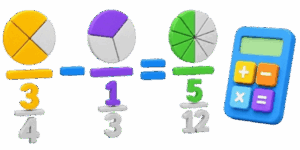
Subtracting fractions is frequently cited as one of the most confusing hurdles in practical mathematics. While addition feels like gathering items into a pile, subtraction involves taking away parts of a whole, which can become messy when the denominators do not match. Traditionally, this process requires finding the least common denominator and performing a series of abstract calculations that often feel disconnected from reality. The 3D Fraction Subtraction Calculator changes that by bringing geometry into the mix, transforming numeric differences into visual, rotating 3D cylinders.

This reference guide explains how to leverage this tool to master subtraction, whether you are managing professional measurements, planning home DIY projects, or helping a student visualize the mechanics of math. By treating numbers as physical slices, the abstract logic becomes intuitive and visual.
Table of Contents
How the 3D Subtraction Tool Simplifies Math
✍ The core of this calculator is its ability to turn data into a 3D environment. When you input two fractions, the tool does not just spit out a number; it creates three distinct stacks. The top stack represents your starting value. The middle stack represents the amount to be removed. The bottom, green stack shows the final result after the subtraction is complete.
The primary benefit of this design is the ability to see the missing space. When you subtract one-quarter from three-quarters, the tool demonstrates exactly why the remaining piece is one-half. By interacting with these shapes through the interface, the brain builds a spatial map of how values interact. It makes the concept of borrowing from whole numbers or converting units into a visual action rather than a memorized sequence of operations.
Using the Calculator Interface
The interface is designed for efficiency and ease of use. No specialized software or technical background is needed. Follow these steps to maximize your output.
Navigation and Interaction
The large central viewport displays the cylinders. You can rotate the view by clicking and dragging your mouse or swiping on your touch screen. This allows you to inspect the slices from any angle, which is particularly helpful when visualizing complex fractions with many divisions. The color coding is deliberate: blue for the starting number, orange for the subtracted value, and green for the remainder.
Control Parameters
Underneath the 3D viewport, you will find input zones for each fraction. You can input whole numbers, numerators, and denominators using either text boxes or the provided sliders. As you move a slider, the 3D shapes react in real-time, growing or shrinking instantly. This responsiveness is perfect for observing how changing a denominator affects the size of the fractional slice.
Output and Documentation
The result is displayed immediately below the math signs. The tool provides a clean, stacked fractional representation that is easy to read and record. If you are documenting your work for a project, the Download Screenshot button captures your current 3D state and the calculation result, providing a high-quality visual reference that you can save or print.
The Mechanics of Subtracting Fractions
Subtracting fractions follows a logical sequence. Understanding the steps can help you verify the output of the calculator and improve your own mental math accuracy.
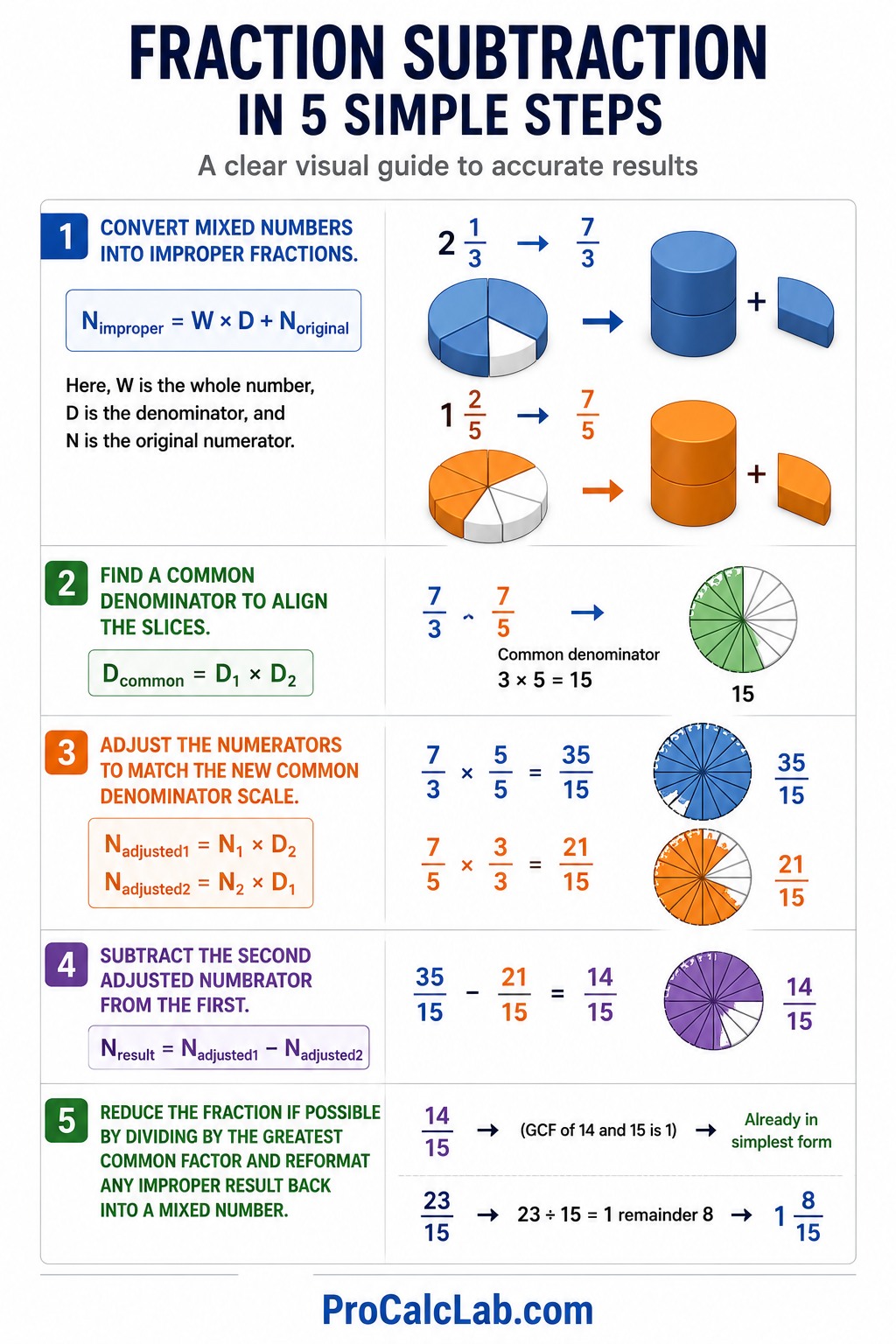
Step 1: Convert mixed numbers into improper fractions.
Nimproper = W × D + Noriginal
Here, W is the whole number, D is the denominator, and N is the original numerator.
Step 2: Find a common denominator to align the slices.
Dcommon = D1 × D2
Step 3: Adjust the numerators to match the new common denominator scale.
Nadjusted1 = N1 × D2
Nadjusted2 = N2 × D1
Step 4: Subtract the second adjusted numerator from the first.
Nresult = Nadjusted1 – Nadjusted2
Step 5: Reduce the fraction if possible by dividing by the greatest common factor and reformating any improper result back into a mixed number.
Practical Example 1: Basic Slice Removal
Suppose you are cutting a piece of material that is 3/4 of a foot long and you need to remove a section that is 1/4 of a foot long.
Input 0 for the whole numbers. On the left, set the numerator to 3 and the denominator to 4. On the right, set the numerator to 1 and the denominator to 4. The tool instantly calculates 3/4 – 1/4 = 2/4. It then simplifies this to 1/2.
Visually, the blue cylinder will show three-quarters filled. The orange cylinder will show one-quarter filled. The green cylinder will display exactly one-half, confirming the remaining length.
Practical Example 2: Subtracting from a Whole
If you have 2 full containers of supplies and need to remove 3/4 of a container for a project, you are dealing with a whole-number subtraction involving fractions.
Enter 2 in the left whole number field and 0 in the numerator and denominator boxes. Enter 0 for the right whole number, 3 for the numerator, and 4 for the denominator. The calculation requires borrowing: 2 becomes 1 and 4/4. Subtracting 3/4 from 4/4 leaves 1/4. The final answer is 1 1/4.
The 3D model is exceptionally helpful here. It shows one blue cylinder remaining whole and a second cylinder being partially diminished by the orange removal shape, leaving a perfect quarter slice in green.
Practical Example 3: Complex Mixed Number Subtraction
Consider a scenario where you have 5 1/3 gallons of water and need to use 2 4/5 gallons for a cleaning task. This involves differing denominators and mixed values.
Set the left inputs to 5 whole, 1 numerator, and 3 denominator. Set the right inputs to 2 whole, 4 numerator, and 5 denominator. The conversion results in 16/3 and 14/5. Using a common denominator of 15, these become 80/15 and 42/15. Subtracting these gives 38/15. Dividing 38 by 15 leaves 2 whole units and a remainder of 8. The result is 2 8/15.
The 3D view renders this clearly by stacking the cylinders. You will see the transition from the starting volume to the reduced volume, with the final green cylinders highlighting the exact quantity remaining.
Reference Tables for Common Subtractions
These tables provide quick lookups for common fractional reductions used in engineering, construction, and culinary arts.
Table 1: Common Fraction Differences
| Start | Remove | Result |
|---|---|---|
| 1/2 | 1/4 | 1/4 |
| 3/4 | 1/2 | 1/4 |
| 7/8 | 1/4 | 5/8 |
| 1 | 1/3 | 2/3 |
| 1 1/2 | 3/4 | 3/4 |
| 2 | 1/8 | 1 7/8 |
| 2/3 | 1/6 | 1/2 |
| 5/8 | 1/2 | 1/8 |
Table 2: Fraction to Decimal Conversion Reference
| Fraction | Decimal |
|---|---|
| 1/16 | 0.06 |
| 1/8 | 0.13 |
| 3/16 | 0.19 |
| 1/4 | 0.25 |
| 5/16 | 0.31 |
| 3/8 | 0.38 |
| 1/2 | 0.50 |
| 5/8 | 0.63 |
| 3/4 | 0.75 |
| 7/8 | 0.88 |
Tips for Accurate Measurement
To ensure your results remain accurate, always verify your input values. A common mistake in manual subtraction is flipping the order of operations. Always ensure the larger value is in the left input box when performing standard subtraction to keep the visual result positive. If the right value is larger, the result will be a negative number, which the calculator represents by removing more than the blue cylinder contains.
🎓 If the 3D model appears empty, check your denominators. A denominator of 1 is the default, but if you accidentally set it to an extremely high number, the slices might become too thin to render distinctly. For most practical applications, values between 1 and 20 offer the best visual clarity.
Conclusion
The 3D Fraction Subtraction Calculator is more than a simple math tool; it is a way to visualize volume and decrease in a measurable, reliable way. By moving from mental abstraction to physical representation, users can avoid the most common errors associated with fractions. Use the rotation features to gain a better perspective on your work and rely on the screenshot function to save your results for future reference. Math is significantly easier when you can actually see the pieces moving.
Selected Bibliography
- Barker, L. Visualizing Fractions: Geometric Approaches to Arithmetic. Math Education Press, 2018.
- Miller, G. The Logic of Subtraction in Modern Engineering. Technical Review Books, 2020.
- Peterson, H. Fractions in Three Dimensions: A Guide for Tradespeople. Construction Digest, 2015.
- Smith, J. Understanding Quantitative Relationships. Academic Mathematics Quarterly, 2022.
- Thompson, R. Applied Mathematics for the Everyday User. Practical Solutions Media, 2019.

Markus Fletcher — Structural Design Specialist
Expert in structural integrity, 3D modeling, and applied mathematics. Markus focuses on creating precise tools for construction professionals and DIY engineers.