Precision is the difference between a project that fits perfectly and a pile of wasted lumber. Whether you are a weekend woodworker, a professional contractor, or someone just trying to calculate the amount of mulch needed for a circular flower bed, geometry is your silent partner. This Geometry Solver and Drafting Tool exists to make these calculations instant and visual. Instead of hunting for a calculator and trying to remember high school math formulas, you can simply input the numbers you have and watch the tool draw the results for you. It handles the math so you can focus on the actual building process.



Table of Contents
Getting Started: How to Use the Tool
The interface is designed for speed and clarity. You will find a navigation bar at the top containing several shape options. Each button represents a different geometric figure. Once a shape is selected, the input panel updates to show the specific dimensions required for that calculation. A key feature of this tool is the ability to solve for missing values. You do not always need every measurement to get a complete picture. For example, if you know the area and one side of a rectangle, the tool will automatically find the other side, the perimeter, and the diagonal.
📝 After entering your data, hit the Solve button. The tool performs two main actions. First, it generates a step-by-step breakdown of the logic used to find the answers. This is incredibly helpful for double-checking the work or understanding the relationship between different dimensions. Second, it creates a real-time draft of the shape. This visual representation helps confirm that the proportions look correct for your specific project. If something looks off in the drawing, it is a sign that a measurement might have been entered incorrectly.
Step-By-Step Workflow
- Select Your Shape: Pick from Rectangle, Square, Circle, Ellipse, Right Triangle, or Isosceles Triangle.
- Input Your Data: Enter the numbers you know into the corresponding boxes. You can use any unit of measurement, such as inches, feet, centimeters, or meters, as long as you stay consistent across all fields.
- Calculate: Click the button to trigger the solver.
- Review the Draft: Look at the generated drawing to see the proportions.
- Check the Math: Read the notes section to see how the results were derived.
Core Shapes and Functional Formulas
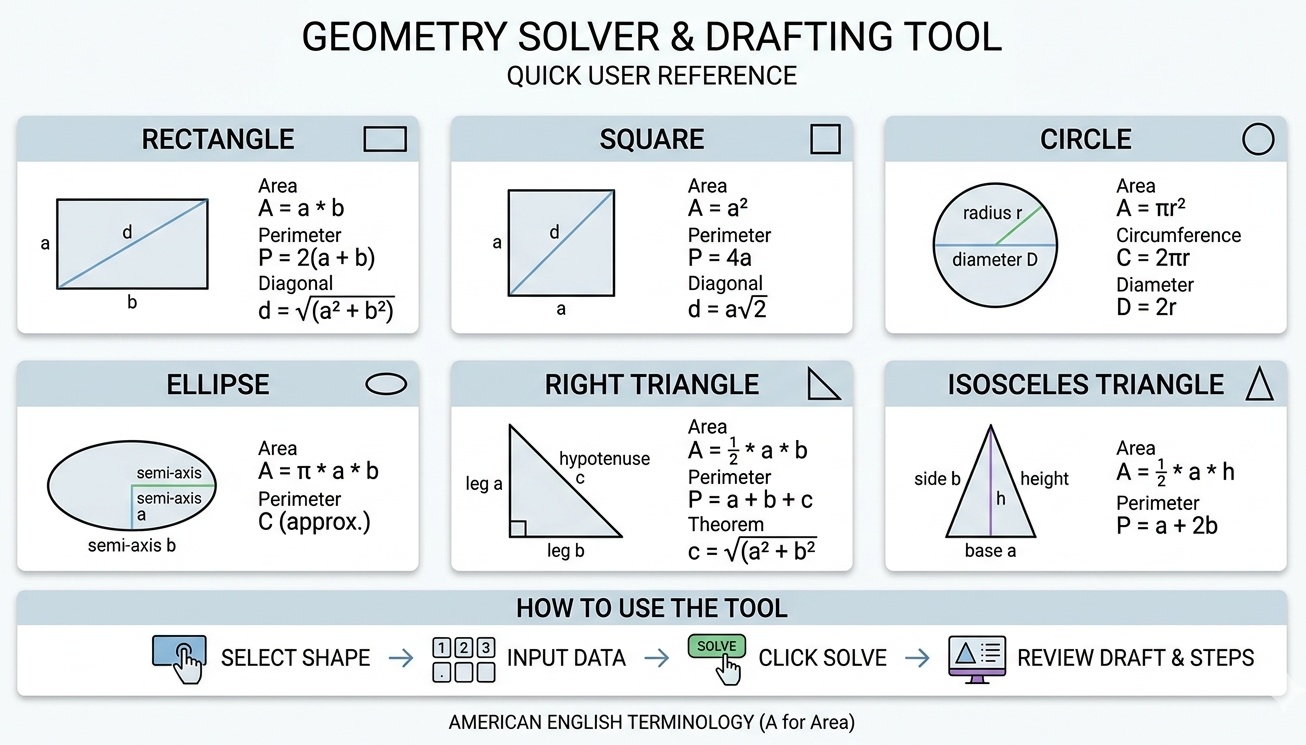
Each geometric shape has its own set of rules and properties. Understanding these basics helps you choose the right tool for the job. Below is a breakdown of the shapes supported by the solver and the logic behind their calculations.
Rectangles and Squares
Rectangles are the most common shapes in construction and design. From floor plans to tabletops, the rectangle is the gold standard for efficiency. A square is simply a specialized rectangle where all sides are equal. To calculate the perimeter of a rectangle, you add the two different side lengths and multiply by 2. The formula looks like this:
Prect = 2 * (a + b)
The area represents the total surface space within the boundaries and is calculated by multiplying the length by the width:
Arect = a * b
When you need to find the distance from one corner to the opposite corner, you are looking for the diagonal. This tool uses the Pythagorean theorem for this calculation:
$$d = \sqrt{a^2 + b^2}$$
Circles and Ellipses
Circular projects often feel more complex because of the constant π, which is approximately 3.14159. When working with circles, you usually deal with the radius, which is the distance from the center to the edge, or the diameter, which is the full width through the center. The circumference is the distance around the outside of the circle. The formula for the circumference is:
C = 2 * π * r
The area of a circle is found by squaring the radius and multiplying by π:
Acircle = π * r^2
Ellipses are essentially stretched circles. They have two different radii: the semi-major axis (long side) and the semi-minor axis (short side). Calculating the area of an ellipse is straightforward:
Aellipse = π * a * b
Finding the exact perimeter of an ellipse is actually a very complex mathematical problem. The tool uses a high-precision approximation to give you a reliable number for your drafting needs.
Triangles: Right and Isosceles
Triangles are used for structural stability. A right triangle has one 90-degree corner, making it perfect for checking if a corner is square. The most famous formula in geometry applies here:
$$a^2 + b^2 = c^2$$
An isosceles triangle has at least 2 sides of equal length. These are common in roof gables and decorative trim. To find the area of any triangle, you multiply the base by the height and divide by 2:
Atri = (b * h) / 2
Reference Tables for Quick Calculations
The following tables provide a quick reference for common geometric properties and unit conversions. Use these to verify your manual calculations or to convert measurements between different systems.
Table 1: Essential Geometric Formulas
| Shape Type | Primary Input | Area Formula | Perimeter/Circumference |
|---|---|---|---|
| Square | Side (a) | a * a | 4 * a |
| Rectangle | Sides (a, b) | a * b | 2 * (a + b) |
| Circle | Radius (r) | π * r² | 2 * π * r |
| Ellipse | Axes (a, b) | π * a * b | ≈ π * [3(a+b) – &sqrt;((3a+b)(a+3b))] |
| Right Triangle | Legs (a, b) | 0.5 * a * b | a + b + &sqrt;(a² + b²) |
| Isosceles Tri. | Base (b), Height (h) | 0.5 * b * h | b + 2 * &sqrt;(h² + (b/2)²) |
| Equilateral Tri. | Side (a) | (&sqrt;3 / 4) * a² | 3 * a |
| Parallelogram | Base (b), Height (h) | b * h | 2 * (side1 + side2) |
| Trapezoid | Bases (a, b), Height (h) | 0.5 * (a + b) * h | Sum of all sides |
| Rhombus | Diagonals (d1, d2) | 0.5 * d1 * d2 | 4 * side |
| Pentagon (Reg) | Side (s) | 1.72048 * s² | 5 * s |
| Hexagon (Reg) | Side (s) | 2.59808 * s² | 6 * s |
| Octagon (Reg) | Side (s) | 4.82843 * s² | 8 * s |
| Sector of Circle | Radius (r), Angle (θ) | 0.5 * r² * θ | r * θ + 2r |
| Annulus | Radii (R, r) | π * (R² – r²) | 2 * π * (R + r) |
Table 2: Unit Conversion Constants
| From Unit | To Unit | Multiply By |
|---|---|---|
| Inches | Millimeters | 25.4 |
| Inches | Centimeters | 2.54 |
| Feet | Inches | 12 |
| Feet | Meters | 0.3048 |
| Yards | Feet | 3 |
| Yards | Meters | 0.9144 |
| Miles | Feet | 5280 |
| Miles | Kilometers | 1.60934 |
| Millimeters | Inches | 0.03937 |
| Centimeters | Inches | 0.3937 |
| Meters | Feet | 3.28084 |
| Meters | Yards | 1.09361 |
| Kilometers | Miles | 0.62137 |
| Square Inches | Square Centimeters | 6.4516 |
| Square Feet | Square Meters | 0.092903 |
Table 3: Common Geometric Constants
| Constant | Value (approx) | Common Application |
|---|---|---|
| Pi (π) | 3.14159265 | Circles, spheres, ellipses |
| Square Root of 2 | 1.41421356 | Diagonal of a square |
| Square Root of 3 | 1.73205081 | Height of equilateral triangle |
| Golden Ratio (φ) | 1.61803398 | Aesthetic proportions |
| Euler’s Number (e) | 2.71828182 | Growth calculations |
| Radian to Degree | 57.2957795 | Angle conversion |
| Degree to Radian | 0.01745329 | Circular motion math |
| Circle Degrees | 360 | Full rotation |
| Right Angle | 90 | Orthogonal corners |
| Triangle Sum | 180 | Internal angles of any triangle |
Real-World Example: Building a Rectangular Raised Garden Bed
Let’s look at a practical scenario using Imperial units. Imagine you want to build a sturdy raised garden bed. You have enough space for a rectangle that is 96 inches long and 48 inches wide. You need to know the perimeter to buy the wood for the walls and the area to calculate how much soil to buy.
- Step 1: The Input. You enter 96 into the length field (a) and 48 into the width field (b).
- Step 2: Perimeter Calculation. The tool uses the formula P = 2 * (96 + 48). First, it adds the numbers together to get 144. Then it multiplies by 2. The result is 288 inches. Since 12 inches equals 1 foot, you can divide 288 by 12 to find that you need 24 feet of lumber for a single layer of the wall.
- Step 3: Area Calculation. The tool multiplies 96 by 48. The result is 4608 square inches. To convert this to square feet, you divide by 144 (which is 12 * 12). The final area is 32 square feet. This helps you determine that if your bed is 1 foot deep, you need exactly 32 cubic feet of soil.
- Step 4: The Diagonal. To ensure the frame is perfectly square during assembly, you check the diagonal. The tool calculates this as:
$$d = \sqrt{96^2 + 48^2} = 107.33$$
By measuring the distance between opposite corners and ensuring it hits 107.33 inches, you guarantee that your garden bed has perfect 90-degree corners. This is much more accurate than trying to use a small carpenter’s square on a 8-foot piece of wood.
Advanced Tips for Precision Drafting
When using the tool for drafting, keep in mind that the visual output is a scaled representation. While it perfectly reflects the proportions of your inputs, you should always rely on the numerical data for actual cutting. Here are a few tips to get the most out of the results:
Account for Material Thickness: In woodworking, the thickness of the boards matters. If you are building a box with an outer width of 48 inches, and your boards are 0.75 inches thick, the inner dimension will be smaller. Always decide if your inputs represent the inner or outer boundaries of your project.
Verify with the Drafting View: If you enter a very small width and a very long length, the drafting tool will show a thin sliver. If your intended project was supposed to be chunky, this visual cue tells you immediately that a decimal point might be in the wrong place.
Use the Solve Logic for Complex Shapes: If you are working on an isosceles triangle roof gable and only know the height and the slope length, enter those. The tool will find the base width for you. This is often easier than trying to climb a ladder to measure the full width of an existing structure.
Why Geometry Accuracy Matters in Daily Life
Inaccurate measurements lead to structural failure or aesthetic disappointment. In flooring, failing to calculate the area correctly can leave you one box short, often discovering that the store has run out of the specific dye lot you were using. In landscaping, miscalculating a circle’s area can result in buying too little stone for a fire pit area, leading to an unfinished look. This tool eliminates those risks. It provides the mathematical certainty required for high-quality work without requiring the user to be a math expert.
📐 Geometry also helps in space planning. Before moving heavy furniture, you can use the ellipse or rectangle solver to see if a piece will fit through a specific clearance. By entering the diagonal of a doorway and the dimensions of a sofa, you can predict if a move is possible. It is a digital tape measure and a brain for your physical space.
Reference List and Further Reading
- Euclid’s Elements. The foundational text for all modern geometry.
- CRC Standard Mathematical Tables and Formulas. A comprehensive resource for high-level constants.
- Construction Master Pro Reference Guide. Practical applications of geometry in the building trades.
- Machinery’s Handbook. Industrial standards for geometric tolerances and mechanical design.
- The Joy of X: A Guided Tour of Math, from One to Infinity by Steven Strogatz. Accessible explanations of mathematical concepts.
- Architecture: Form, Space, and Order by Francis D.K. Ching. How geometry defines physical environments.

Markus Fletcher — Structural Design Specialist
Expert in structural integrity, 3D modeling, and applied mathematics. Markus focuses on creating precise tools for construction professionals and DIY engineers.


