← Element symbol
← Element name
The periodic table is one of the most important tools in chemistry, physics, materials science, and practical technical work. This interactive calculator presents the table in a visual, easy-to-use format so users can find an element quickly, inspect its basic properties, compare it with another element, and open a 3D view for a more intuitive look at atomic structure.



| N | Symbol | Name | Atomic Mass | Nucleus Composition |
|---|---|---|---|---|
| 1 | H | Hydrogen | 1.008 | 1p⁺ / 0n⁰ |
| 2 | He | Helium | 4.0026 | 2p⁺ / 2n⁰ |
| 3 | Li | Lithium | 6.94 | 3p⁺ / 4n⁰ |
| 4 | Be | Beryllium | 9.0122 | 4p⁺ / 5n⁰ |
| 5 | B | Boron | 10.81 | 5p⁺ / 6n⁰ |
| 6 | C | Carbon | 12.011 | 6p⁺ / 6n⁰ |
| 7 | N | Nitrogen | 14.007 | 7p⁺ / 7n⁰ |
| 8 | O | Oxygen | 15.999 | 8p⁺ / 8n⁰ |
| 9 | F | Fluorine | 18.998 | 9p⁺ / 10n⁰ |
| 10 | Ne | Neon | 20.180 | 10p⁺ / 10n⁰ |
| 11 | Na | Sodium | 22.990 | 11p⁺ / 12n⁰ |
| 12 | Mg | Magnesium | 24.305 | 12p⁺ / 12n⁰ |
| 13 | Al | Aluminum | 26.982 | 13p⁺ / 14n⁰ |
| 14 | Si | Silicon | 28.085 | 14p⁺ / 14n⁰ |
| 15 | P | Phosphorus | 30.974 | 15p⁺ / 16n⁰ |
| 16 | S | Sulfur | 32.06 | 16p⁺ / 16n⁰ |
| 17 | Cl | Chlorine | 35.45 | 17p⁺ / 18n⁰ |
| 18 | Ar | Argon | 39.948 | 18p⁺ / 22n⁰ |
| 19 | K | Potassium | 39.098 | 19p⁺ / 20n⁰ |
| 20 | Ca | Calcium | 40.078 | 20p⁺ / 20n⁰ |
| 21 | Sc | Scandium | 44.956 | 21p⁺ / 24n⁰ |
| 22 | Ti | Titanium | 47.867 | 22p⁺ / 26n⁰ |
| 23 | V | Vanadium | 50.942 | 23p⁺ / 28n⁰ |
| 24 | Cr | Chromium | 51.996 | 24p⁺ / 28n⁰ |
| 25 | Mn | Manganese | 54.938 | 25p⁺ / 30n⁰ |
| 26 | Fe | Iron | 55.845 | 26p⁺ / 30n⁰ |
| 27 | Co | Cobalt | 58.933 | 27p⁺ / 32n⁰ |
| 28 | Ni | Nickel | 58.693 | 28p⁺ / 31n⁰ |
| 29 | Cu | Copper | 63.546 | 29p⁺ / 35n⁰ |
| 30 | Zn | Zinc | 65.38 | 30p⁺ / 35n⁰ |
| 31 | Ga | Gallium | 69.723 | 31p⁺ / 39n⁰ |
| 32 | Ge | Germanium | 72.630 | 32p⁺ / 41n⁰ |
| 33 | As | Arsenic | 74.922 | 33p⁺ / 42n⁰ |
| 34 | Se | Selenium | 78.971 | 34p⁺ / 45n⁰ |
| 35 | Br | Bromine | 79.904 | 35p⁺ / 45n⁰ |
| 36 | Kr | Krypton | 83.798 | 36p⁺ / 48n⁰ |
| 37 | Rb | Rubidium | 85.468 | 37p⁺ / 48n⁰ |
| 38 | Sr | Strontium | 87.62 | 38p⁺ / 50n⁰ |
| 39 | Y | Yttrium | 88.906 | 39p⁺ / 50n⁰ |
| 40 | Zr | Zirconium | 91.224 | 40p⁺ / 51n⁰ |
| 41 | Nb | Niobium | 92.906 | 41p⁺ / 52n⁰ |
| 42 | Mo | Molybdenum | 95.95 | 42p⁺ / 54n⁰ |
| 43 | Tc | Technetium | 98 | 43p⁺ / 55n⁰ |
| 44 | Ru | Ruthenium | 101.07 | 44p⁺ / 57n⁰ |
| 45 | Rh | Rhodium | 102.91 | 45p⁺ / 58n⁰ |
| 46 | Pd | Palladium | 106.42 | 46p⁺ / 60n⁰ |
| 47 | Ag | Silver | 107.87 | 47p⁺ / 61n⁰ |
| 48 | Cd | Cadmium | 112.41 | 48p⁺ / 64n⁰ |
| 49 | In | Indium | 114.82 | 49p⁺ / 66n⁰ |
| 50 | Sn | Tin | 118.71 | 50p⁺ / 69n⁰ |
| 51 | Sb | Antimony | 121.76 | 51p⁺ / 71n⁰ |
| 52 | Te | Tellurium | 127.60 | 52p⁺ / 76n⁰ |
| 53 | I | Iodine | 126.90 | 53p⁺ / 74n⁰ |
| 54 | Xe | Xenon | 131.29 | 54p⁺ / 77n⁰ |
| 55 | Cs | Cesium | 132.91 | 55p⁺ / 78n⁰ |
| 56 | Ba | Barium | 137.33 | 56p⁺ / 81n⁰ |
| 57 | La | Lanthanum | 138.91 | 57p⁺ / 82n⁰ |
| 58 | Ce | Cerium | 140.12 | 58p⁺ / 82n⁰ |
| 59 | Pr | Praseodymium | 140.91 | 59p⁺ / 82n⁰ |
| 60 | Nd | Neodymium | 144.24 | 60p⁺ / 84n⁰ |
| 61 | Pm | Promethium | 145 | 61p⁺ / 84n⁰ |
| 62 | Sm | Samarium | 150.36 | 62p⁺ / 88n⁰ |
| 63 | Eu | Europium | 151.96 | 63p⁺ / 89n⁰ |
| 64 | Gd | Gadolinium | 157.25 | 64p⁺ / 93n⁰ |
| 65 | Tb | Terbium | 158.93 | 65p⁺ / 94n⁰ |
| 66 | Dy | Dysprosium | 162.50 | 66p⁺ / 97n⁰ |
| 67 | Ho | Holmium | 164.93 | 67p⁺ / 98n⁰ |
| 68 | Er | Erbium | 167.26 | 68p⁺ / 99n⁰ |
| 69 | Tm | Thulium | 168.93 | 69p⁺ / 100n⁰ |
| 70 | Yb | Ytterbium | 173.05 | 70p⁺ / 103n⁰ |
| 71 | Lu | Lutetium | 174.97 | 71p⁺ / 104n⁰ |
| 72 | Hf | Hafnium | 178.49 | 72p⁺ / 106n⁰ |
| 73 | Ta | Tantalum | 180.95 | 73p⁺ / 108n⁰ |
| 74 | W | Tungsten | 183.84 | 74p⁺ / 110n⁰ |
| 75 | Re | Rhenium | 186.21 | 75p⁺ / 111n⁰ |
| 76 | Os | Osmium | 190.23 | 76p⁺ / 114n⁰ |
| 77 | Ir | Iridium | 192.22 | 77p⁺ / 115n⁰ |
| 78 | Pt | Platinum | 195.08 | 78p⁺ / 117n⁰ |
| 79 | Au | Gold | 196.97 | 79p⁺ / 118n⁰ |
| 80 | Hg | Mercury | 200.59 | 80p⁺ / 121n⁰ |
| 81 | Tl | Thallium | 204.38 | 81p⁺ / 123n⁰ |
| 82 | Pb | Lead | 207.2 | 82p⁺ / 125n⁰ |
| 83 | Bi | Bismuth | 208.98 | 83p⁺ / 126n⁰ |
| 84 | Po | Polonium | 209 | 84p⁺ / 125n⁰ |
| 85 | At | Astatine | 210 | 85p⁺ / 125n⁰ |
| 86 | Rn | Radon | 222 | 86p⁺ / 136n⁰ |
| 87 | Fr | Francium | 223 | 87p⁺ / 136n⁰ |
| 88 | Ra | Radium | 226 | 88p⁺ / 138n⁰ |
| 89 | Ac | Actinium | 227 | 89p⁺ / 138n⁰ |
| 90 | Th | Thorium | 232.04 | 90p⁺ / 142n⁰ |
| 91 | Pa | Protactinium | 231.04 | 91p⁺ / 140n⁰ |
| 92 | U | Uranium | 238.03 | 92p⁺ / 146n⁰ |
| 93 | Np | Neptunium | 237 | 93p⁺ / 144n⁰ |
| 94 | Pu | Plutonium | 244 | 94p⁺ / 150n⁰ |
| 95 | Am | Americium | 243 | 95p⁺ / 148n⁰ |
| 96 | Cm | Curium | 247 | 96p⁺ / 151n⁰ |
| 97 | Bk | Berkelium | 247 | 97p⁺ / 150n⁰ |
| 98 | Cf | Californium | 251 | 98p⁺ / 153n⁰ |
| 99 | Es | Einsteinium | 252 | 99p⁺ / 153n⁰ |
| 100 | Fm | Fermium | 257 | 100p⁺ / 157n⁰ |
| 101 | Md | Mendelevium | 258 | 101p⁺ / 157n⁰ |
| 102 | No | Nobelium | 259 | 102p⁺ / 157n⁰ |
| 103 | Lr | Lawrencium | 266 | 103p⁺ / 163n⁰ |
| 104 | Rf | Rutherfordium | 267 | 104p⁺ / 163n⁰ |
| 105 | Db | Dubnium | 268 | 105p⁺ / 163n⁰ |
| 106 | Sg | Seaborgium | 269 | 106p⁺ / 163n⁰ |
| 107 | Bh | Bohrium | 270 | 107p⁺ / 163n⁰ |
| 108 | Hs | Hassium | 277 | 108p⁺ / 169n⁰ |
| 109 | Mt | Meitnerium | 278 | 109p⁺ / 169n⁰ |
| 110 | Ds | Darmstadtium | 281 | 110p⁺ / 171n⁰ |
| 111 | Rg | Roentgenium | 282 | 111p⁺ / 171n⁰ |
| 112 | Cn | Copernicium | 285 | 112p⁺ / 173n⁰ |
| 113 | Nh | Nihonium | 286 | 113p⁺ / 173n⁰ |
| 114 | Fl | Flerovium | 289 | 114p⁺ / 175n⁰ |
| 115 | Mc | Moscovium | 290 | 115p⁺ / 175n⁰ |
| 116 | Lv | Livermorium | 293 | 116p⁺ / 177n⁰ |
| 117 | Ts | Tennessine | 294 | 117p⁺ / 177n⁰ |
| 118 | Og | Oganesson | 294 | 118p⁺ / 176n⁰ |
The main idea is simple: instead of treating the periodic table as a static chart, this tool turns it into a practical reference panel. You can search for an element by atomic number, symbol, or name, then open a detailed view to read the most important facts in one place. That makes it useful for students, teachers, engineers, hobbyists, and anyone who needs a fast chemical reference without opening a textbook.
Table of Contents
What this calculator is for
This calculator is designed to help you explore the periodic table in a more convenient way. It is especially helpful when you need to identify an element, confirm its symbol, check its atomic number, or compare two elements side by side. The interface is also useful for learning because the color coding groups elements by family, which makes broad chemical patterns easier to see.
In the detail view, the selected element is shown with a summary table and a 3D atom model. That 3D view is meant as a visual aid, not as a strict scientific simulation. It gives a clearer sense of the element as a physical object and helps users connect the element name, symbol, and atomic properties with a visual representation.
How to use it
1. Browse the table
When the calculator opens, you see the periodic table arranged in the standard layout. Each cell represents one element. The large symbol in the center identifies the element, the atomic number appears in the corner, and the element name appears below the symbol. The color of the cell indicates the element family.
2. Search for an element
Use the search field to find an element by atomic number, symbol, or name. For example, you can type 26, Fe, or iron. This is the fastest way to jump directly to an element when you already know part of its identity.
3. Open details
Click an element once to highlight it. Click the same element again to open the detail view. In that view you can read the atomic number, group, period, atomic mass, electron configuration, nucleus composition, and electron count. This is the best mode for quick study or for checking facts while working on chemistry-related tasks.
4. Compare two elements
Click one element, then click a different element to compare them side by side. Comparison is useful when you want to see how two elements differ in group, period, category, or basic atomic data. This is especially helpful for beginners who are learning how the table is organized.
5. Return to the table
Use the home button to go back from the detail or comparison view to the main table. That lets you continue browsing without reloading the page.
6. Use fullscreen mode
The fullscreen button expands the calculator so the table and detail view are easier to read. This is useful on smaller screens or when you want to focus on one element without distractions.
How to read the table
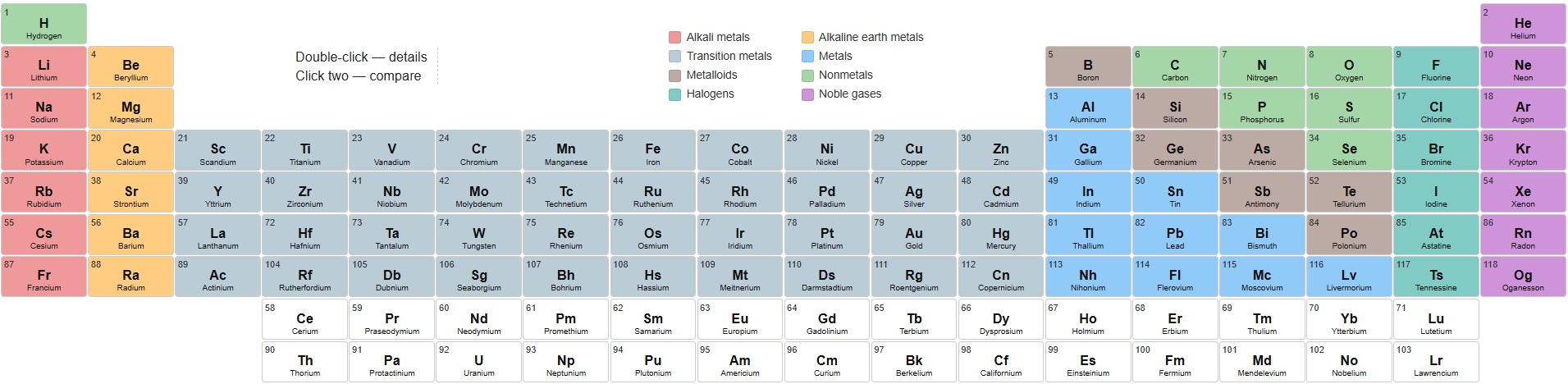
Each element cell contains three basic pieces of information: the atomic number, the symbol, and the element name. These three values are the core identifiers used in chemistry.
- Atomic number tells you how many protons the atom has.
- Symbol is the short chemical abbreviation, such as H, O, Fe, or Au.
- Name is the full element name in American English.
The table layout follows the standard periodic arrangement. Elements in the same column belong to similar families and often share comparable chemical behavior. Elements in the same row have the same principal energy level in their electron structure. That arrangement is one of the reasons the periodic table is so useful: it combines identity, organization, and chemical pattern in one chart.
What the colors mean
The colors are not just decorative. They help group elements by category so patterns are easier to recognize. A quick glance can tell you whether an element is a metal, nonmetal, noble gas, halogen, or one of the specialized families.
- Alkali metals are highly reactive metals in Group 1.
- Alkaline earth metals are reactive metals in Group 2.
- Transition metals occupy the central block of the table and include many widely used industrial metals.
- Post-transition metals are metallic elements with properties between transition metals and metalloids.
- Metalloids show mixed metallic and nonmetallic behavior.
- Nonmetals include several elements essential to life and many common gases.
- Halogens are reactive nonmetals in Group 17.
- Noble gases are very stable gases in Group 18.
- Lanthanides and actinides are the two inner series displayed separately at the bottom in many periodic tables.
This color system is especially helpful if you are learning the table for the first time. Instead of memorizing every element individually, you begin to recognize families, and the table starts to make structural sense.
What the detail panel shows
The detail panel gives a compact profile of the selected element. The fields are chosen to be practical and readable, so the user can understand the element without digging through a chemistry database.
- Atomic Number identifies the element in the periodic table.
- Group shows the vertical column used in periodic classification.
- Period shows the horizontal row.
- Atomic Mass gives the standard atomic mass value.
- Electron Configuration summarizes the electron arrangement.
- Nucleus Composition shows the approximate number of protons and neutrons.
- Electrons shows the electron count for a neutral atom.
For many users, the most important fields are the atomic number, symbol, name, and category. The other values are there to provide context and help connect the element to its basic chemical identity.
What the 3D atom view is for
The 3D model is meant to make the selected element feel more concrete and memorable. It is not intended to replace an advanced atomic model, but it gives a useful visual impression of a nucleus with electrons arranged around it. For learners, this is often easier to understand than a purely textual description.

In practical terms, the 3D view helps users remember that an element is not just a label on a table. It represents a real atomic species with a specific number of protons, a specific electron structure, and properties that follow from that structure.
How to use the calculator for study
🎓 If your goal is learning, a good approach is to work in small steps. First, find the element on the table. Then read its symbol and name. Next, open the details and check its group and period. After that, use comparison mode to see how it differs from a nearby element. This sequence helps reinforce the logic of the periodic table rather than just memorizing isolated facts.
A useful study method is to focus on element families:
- Compare alkali metals with alkaline earth metals.
- Look at noble gases and notice their stable placement on the far right.
- Study a transition metal row and see how many familiar industrial elements appear together.
- Review the lanthanides and actinides as two separate inner series.
This kind of repeated exploration makes the table easier to remember because it emphasizes relationships rather than isolated names.
How to use it for quick reference
If you already know a chemical symbol, this tool works as a rapid lookup system. Type the symbol, and the matching element appears immediately. If you only know a name, the search will still help. If you only know an atomic number, that works too. This flexibility makes the calculator useful in writing, schoolwork, project planning, and general fact checking.
For example, you might need to confirm whether Fe is iron, whether Au is gold, or where Si sits in the table. The calculator handles those tasks quickly and without extra navigation.
Why the periodic table matters
The periodic table is more than a list of elements. It is a system for organizing matter. Its structure reflects recurring chemical behavior, which is why it remains one of the most important reference tools in science. Once you understand how the table is arranged, a lot of chemistry becomes easier to read and predict.
The table helps answer questions like:
- Which elements are metals and which are nonmetals?
- Which elements behave similarly?
- Which families are highly reactive?
- Which elements are commonly used in materials, electronics, medicine, or industry?
In other words, the periodic table is not only a memorization chart. It is a map of chemical structure and behavior.
Basic reference information on the elements
The elements are arranged by increasing atomic number, starting with hydrogen and ending with oganesson. Each element has a unique atomic number, and that number defines the identity of the atom. The symbol is the universal shorthand used in formulas, labels, and scientific writing.
Some common examples are easy to recognize:
- Hydrogen is the lightest element and the first in the table.
- Carbon is central to organic chemistry and life science.
- Oxygen is essential for respiration and oxidation processes.
- Iron is one of the most important structural metals.
- Copper is widely used in electrical applications.
- Gold is a noble metal with strong resistance to corrosion.
- Uranium is an actinide with major importance in nuclear technology.
As you move across the table, you can observe broad trends. Metallic character generally changes across periods, while reactivity, atomic size, and electron structure follow recurring patterns. These trends are part of the reason the periodic table remains so powerful.
When this tool is especially useful
This calculator is handy in many everyday and educational situations. It is useful during homework, classroom review, lab preparation, technical writing, content creation, and general curiosity. It can also support fast fact checking when you need to identify an element that appears in a formula, chart, or article.
It is also useful when you want to compare two elements that are easy to confuse. For example, users often mix up symbols or names that look similar at first glance. A structured calculator removes that uncertainty quickly.
Practical tips for users
- Use the search box when you already know part of the element identity.
- Use the color coding to understand the family of the element at a glance.
- Use comparison mode to study pairs of elements with similar names or properties.
- Use detail mode when you need atomic number, group, period, or configuration data.
- Use fullscreen mode when you want a larger and cleaner workspace.
For best results, think of the calculator as a reference companion. It is fast enough for quick lookups, but it is also organized enough to support meaningful learning.
Frequently asked questions
What should I type in the search box?
You can type an atomic number, a chemical symbol, or an element name. The search is designed to be flexible and easy to use.
Why do some element names look different from Russian or older school versions?
The calculator uses American English names, which are the standard form used in U.S. educational and technical writing. Examples include aluminum, sulfur, and cesium.
Is the 3D atom model exact?
It is a visual representation meant to help users understand the element better. It is not a laboratory-grade atomic simulation.
Can I use this for learning chemistry basics?
Yes. It is well suited for basic study, review, and quick reference. It is especially useful for learning symbols, names, categories, and table structure.
✍ In American English, several element names use spelling forms that differ from British English or older international usage. The most common examples are aluminum instead of aluminium and sulfur instead of sulphur. This calculator follows the American spelling convention for consistency with U.S. educational materials.
Conclusion
This interactive periodic table calculator is built as a clear reference tool. It helps users find elements, understand their placement, compare them with other elements, and inspect their core properties in a simple and practical format. Whether you are studying chemistry or just need a reliable lookup tool, the calculator gives you a fast path to the information you need.
🧪 The best way to use it is to explore the table, search for familiar elements, open details, and compare related elements side by side. With repeated use, the structure of the periodic table becomes easier to understand, and the chemistry behind it becomes easier to remember.
Literature
- Brown, T. L., LeMay, H. E., Bursten, B. E., Murphy, C. J., Woodward, P. M., & Stoltzfus, M. W. Chemistry: The Central Science.
- Chang, R., & Goldsby, K. A. Chemistry.
- Zumdahl, S. S., & Zumdahl, S. A. Chemistry.
- IUPAC. Periodic Table of the Elements.
- NIST. Atomic Weights and Isotopic Compositions.
- Greenwood, N. N., & Earnshaw, A. Chemistry of the Elements.
- Atkins, P., & Jones, L. Chemical Principles.
- Housecroft, C. E., & Sharpe, A. G. Inorganic Chemistry.

David Parry — Senior Engineering Analyst
Specializing in electronics and physics-based simulations with 20+ years of engineering experience. David ensures the mathematical and physical accuracy of the tools at ProCalcLab.