| Paved Area | — ft² |
| Asphalt Volume | — yd³ |
| Asphalt Weight | — tons |
| Weight with Allowance | — tons |
| Application Rate | — lb/ft² |
| Dump Truck Loads | — |
| Total Cost | — USD |
|---|
This calculator helps plan asphalt work. Enter the paved area, thickness, density, waste allowance, truck capacity, and unit price, then get the numbers that matter most: coverage, volume, weight, truck loads, and total cost. The 3D view adds a simple visual check, so the project is easier to understand at a glance.


For driveways, parking lots, private roads, repairs, and small paving jobs, that kind of quick planning saves time and keeps material orders closer to reality. It also makes it easier to compare options before a crew starts work.
Table of Contents
What this calculator is for
The main purpose is to estimate how much asphalt is needed for a paved surface. The calculator turns simple inputs into practical output. It shows how large the area is, how much asphalt volume is required, how heavy the mix will be, how much extra material should be added for waste, how many dump truck loads are needed, and what the job may cost. The tool is useful when planning new paving, resurfacing, patching, or cost estimating. It is also helpful when checking contractor quotes, because it gives a clear way to compare the basic math behind the project.
How to use it
- Choose the unit system at the top. Imperial starts first.
- Enter the length and width of the paved area.
- Enter the area directly if the project is already known in square feet or square meters.
- Set the asphalt thickness.
- Enter the material density if a project uses a specific mix.
- Set the waste allowance.
- Enter the dump truck capacity.
- Enter the price per area unit.
The calculator updates the result right away. The table shows the answer in a clean format, and the 3D panel gives a rough visual model of the slab.
What each input means
| Field | What it means | Why it matters |
|---|---|---|
| Length | One side of the paved section | Used to calculate total area |
| Width | The other side of the paved section | Used together with length |
| Area | The full surface to be paved | Useful when the size is already known |
| Thickness | How deep the asphalt layer will be | Controls volume and weight |
| Density | Weight of the mix per unit volume | Used to convert volume into mass |
| Waste allowance | Extra material added for loss and overage | Prevents short orders |
| Dump truck capacity | How much one truck can carry | Helps estimate haul count |
| Price per area | Cost charged for the paved area | Used for total project cost |
Imperial and metric units
The calculator supports both systems. For American users, imperial is the natural choice because it keeps the workflow familiar. Metric is still available when a project uses metric plans or supplier data.
| Measurement | Imperial | Metric |
|---|---|---|
| Length | ft | m |
| Area | ft² | m² |
| Thickness | in | cm |
| Volume | yd³ | m³ |
| Mass | tons | t |
| Density | lb/ft³ | t/m³ |
| Application rate | lb/ft² | kg/m² |
Formulas used in asphalt planning
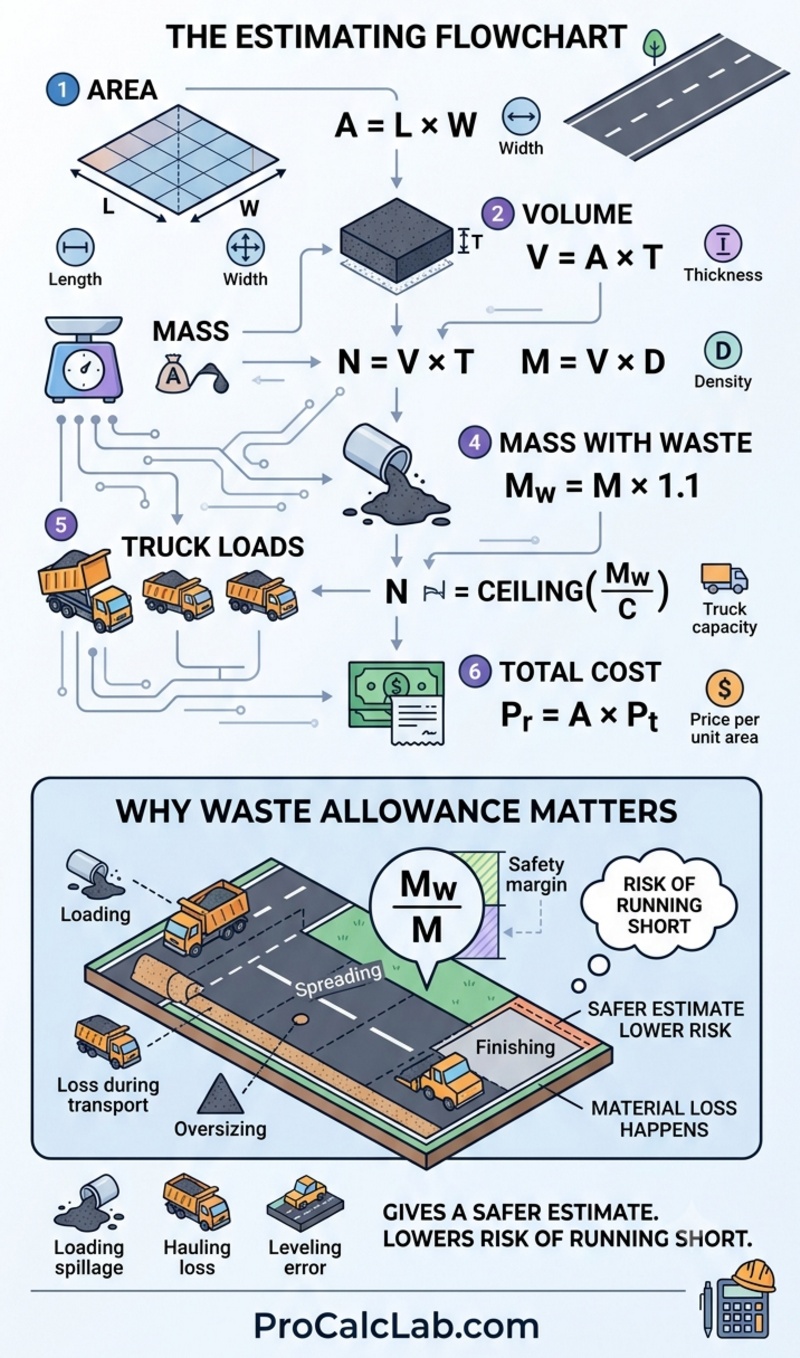
The math behind asphalt estimating is straightforward. These are the basic relationships behind the result table.
Area
A = L × W
Volume
V = A × T
Mass
M = V × D
Mass with waste allowance
Mw = M × 1.1
Truck loads
N = CEILING(Mw / C)
Total cost
Pr = A × Pt
Here, L is length, W is width, A is area, T is thickness, D is density, M is mass, C is truck capacity, and Pt is the price per area unit.
Why waste allowance matters
No paving job is perfectly exact. Material loss happens during loading, hauling, spreading, leveling, and finishing. A waste allowance gives a safer estimate and lowers the risk of running short near the end of the project.
📊 A small allowance is normal on clean, simple jobs. A larger allowance may make sense on rough surfaces, complex shapes, or projects with more handling loss. The calculator lets that margin be added directly to the mass result.
How the 3D view helps
The 3D panel is not just decoration. It gives a quick visual sense of the slab shape and thickness. That matters because numbers alone can be hard to picture. A simple model helps confirm that the surface size and depth feel right before moving ahead with an order. It also makes the page easier for nontechnical users. Someone who is not used to reading estimates can still see that the project is a broad area with a visible layer on top.
Example with imperial numbers
Here is a complete example using American-style units.
| Input | Value | Result use |
|---|---|---|
| Length | 100 ft | Used to find area |
| Width | 20 ft | Used to find area |
| Thickness | 2 in | Used to find volume |
| Density | 146.7 lb/ft³ | Used to find weight |
| Waste allowance | 10% | Added to final mass |
| Truck capacity | 20 tons | Used for haul count |
| Price per area | $4 / ft² | Used for cost |
Now walk through the math step by step.
1. Area
A = 100 × 20 = 2,000 ft²
2. Thickness in feet
2 in = 0.1667 ft
3. Volume
V = 2,000 × 0.1667 = 333.4 ft³
4. Volume in cubic yards
333.4 ÷ 27 = 12.35 yd³
5. Mass
M = 333.4 × 146.7 = 48,906 lb
6. Mass in tons
48,906 ÷ 2,000 = 24.45 tons
7. Mass with waste allowance
Mw = 24.45 × 1.10 = 26.90 tons
8. Truck loads
N = CEILING(26.90 / 20) = 2 loads
9. Total cost
Pr = 2,000 × 4 = $8,000
This simple example shows how the calculator turns a few inputs into a clean estimate. The final result is not just one number. It is a full planning picture that includes size, material need, logistics, and budget.
What the output table means
| Output | Meaning | Why it helps |
|---|---|---|
| Paved Area | Surface that will receive asphalt | Confirms the job size |
| Asphalt Volume | Material space needed for the layer | Used for ordering and planning |
| Asphalt Weight | Estimated mass of the mix | Useful for hauling and supplier checks |
| Asphalt Weight with Allowance | Weight plus extra margin | Protects against shortage |
| Application Rate | Weight spread over one square foot | Helpful for comparison with specs |
| Dump Truck Loads | How many deliveries are needed | Supports haul planning |
| Total Cost | Estimated project cost | Gives a fast budget number |
Good habits when estimating asphalt
- Measure the paved area carefully before entering values.
- Keep thickness realistic for the project type.
- Use the same unit system across the whole estimate.
- Do not skip waste allowance on real jobs.
- Check truck capacity against the supplier or hauling plan.
- Use the cost field as a quick budget guide, not a final bid.
Common mistakes to avoid
- One common mistake is mixing unit systems. Another is using the wrong thickness.
- Even a small change in thickness can make a large difference in volume and mass.
- A third mistake is forgetting waste allowance, which can leave the job short on material.
This tool is especially useful for private driveways, lot resurfacing, patch work, roadway maintenance, and early-stage cost planning. It is also a practical reference for homeowners, contractors, estimators, and property managers who need a quick number before requesting material or labor quotes.
Reference notes
The values used in a calculator like this are based on common paving estimation methods. Actual job requirements can vary depending on surface condition, mix design, compaction target, haul distance, and project specifications. For that reason, the calculator should be used as a planning tool rather than a final construction contract document.

Selected references
- U.S. Army Corps of Engineers. EM 1110-2-2300: General Design and Construction Considerations for Earth and Rock-Fill Dams. Washington, DC, 2004.
- U.S. Army Corps of Engineers. EM 385-1-1: Safety and Health Requirements Manual. Washington, DC.
- Federal Highway Administration. Earthwork Design. U.S. Department of Transportation.
- Federal Highway Administration. Earthwork and Drainage Construction Reviews. U.S. Department of Transportation.
- Federal Highway Administration. Engineer’s Estimate Manual. U.S. Department of Transportation.
- Natural Resources Conservation Service. Soil Survey Manual. USDA Agriculture Handbook No. 18.
- Natural Resources Conservation Service. National Soil Survey Handbook. United States Department of Agriculture.
- Natural Resources Conservation Service. Field Book for Describing and Sampling Soils. United States Department of Agriculture.
- Peurifoy R.L., Schexnayder C.J. Construction Planning, Equipment, and Methods. McGraw-Hill Education.
- Peterson S. Construction Estimating Using Excel. Pearson Education.
- Dagostino F.R., Peterson S.J. Estimating in Building Construction. Pearson Education.
- Harris F., McCaffer R. Modern Construction Management. Wiley-Blackwell.

Markus Fletcher — Structural Design Specialist
Expert in structural integrity, 3D modeling, and applied mathematics. Markus focuses on creating precise tools for construction professionals and DIY engineers.