| Element | Formula | Result |
|---|
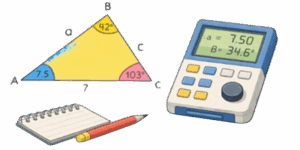
This interactive triangle calculator helps you get exact sides, angles, area and perimeter in seconds. It’s perfect for learning, quick checks on the job, or sketching ideas — works in the browser on desktop and mobile. Below you’ll find the key formulas, how the tool handles different triangle types, clear examples (converted to inches) and practical tips for real projects.



Table of Contents
Core formulas
The calculator relies on standard geometry identities and displays them with MathJax so formulas render cleanly.
- Sum of interior angles: $$A + B + C = 180^\circ$$
- Heron’s formula for area: $$S = \sqrt{p(p-a)(p-b)(p-c)}$$
$$\text{where}\quad p=\frac{a+b+c}{2}$$ - Pythagorean theorem (right triangle): $$c^2 = a^2 + b^2$$
- Sine rule: $$\frac{a}{\sin A} = \frac{b}{\sin B} = \frac{c}{\sin C}$$
- Cosine rule: $$c^2 = a^2 + b^2 – 2ab\cos C$$
Modes supported
The calculator supports four common modes and picks the right formulas automatically:
- Right triangle — compute the third side, area and angles from two sides or one side plus an acute angle.
- Isosceles — enter base and leg or an angle and a leg; get heights, angles, area and perimeter.
- Equilateral — give one side, or height, and receive exact height, area and perimeter instantly.
- General triangle — full solver: feed any valid combination of three independent parameters (side/angle combos) and receive a complete solution with validation.
Parameter guide
| Parameter | Description |
|---|---|
| a, b, c | Side lengths (any length units) |
| A, B, C | Angles opposite sides a, b, c (degrees) |
| S | Area |
| P | Perimeter |
| h | Height dropped to the given side |
Area can be computed from side+height or by Heron when three sides are known. For angle-driven inputs the calculator uses the sine and cosine rules. The solver performs consistency checks and flags impossible combinations (for example, when sides violate the triangle inequality).
✍ Tip: enter lengths in the same units. If you mix units the result will be meaningless. If you work in US customary units, use inches or feet consistently.
Worked examples
Example 1 — isosceles triangle
Given: base = 2.36 in, equal sides = 1.97 in each. Find angles, area and perimeter.
Step 1 — semiperimeter:
$$p=\frac{a+b+c}{2}=$$
$$=\frac{1.97+1.97+2.36}{2}=3.15\ \text{in}$$
Step 2 — Heron’s area:
$$S=\sqrt{p(p-a)(p-b)(p-c)}=$$
$$=\sqrt{3.15\cdot1.18\cdot1.18\cdot0.79}=$$
$$=1.861\ \text{in}^2$$
Step 3 — apex angle (angle opposite base) via cosine rule:
$$\cos\theta=\frac{a^2+b^2-c^2}{2ab}=$$
$$=\frac{1.97^2+1.97^2-2.36^2}{2\cdot1.97^2}=$$
$$=0.2825$$
$$\theta\approx\arccos(0.2825)\approx73.58^\circ$$
Base angles (each):
$$B=C=\frac{180^\circ-\theta}{2}\approx53.21^\circ$$
Step 4 — perimeter:
$$P=1.97+1.97+2.36=6.30\ \text{in}$$
- Area ≈ 1.861 in²
- Apex angle ≈ 73.58°, base angles ≈ 53.21°
- Perimeter = 6.30 in
Example 2 — classic right triangle
Given legs 3.00 in and 4.00 in. Find hypotenuse, area and angles.
Hypotenuse by Pythagoras:
$$c=\sqrt{3^2+4^2}=\sqrt{9+16}=5.00\ \text{in}$$
$$S=\frac12\cdot3\cdot4=6.00\ \text{in}^2$$
$$\tan A=\frac{3}{4}\Rightarrow A\approx36.87^\circ,$$
$$B\approx53.13^\circ,\quad C=90^\circ$$
- Hypotenuse = 5.00 in
- Area = 6.00 in²
- Angles ≈ 36.87°, 53.13°, 90°
- Perimeter = 3 + 4 + 5 = 12.00 in
Example 3 — equilateral triangle
Given side = 7.00 in. Height and area:
$$h=\frac{\sqrt{3}}{2},a=\frac{\sqrt{3}}{2}\cdot7\approx6.062\ \text{in}$$
$$S=\frac{\sqrt{3}}{4},a^2=\frac{\sqrt{3}}{4}\cdot49\approx21.22\ \text{in}^2$$
$$A=B=C=60^\circ,\quad P=21.00\ \text{in}$$
Common pitfalls and practical advice
- Triangle inequality: ensure a+b>c, b+c>a, a+c>b. The solver will warn if input is impossible.
- Round only final results. Internal calculations use full precision, rounding is for display.
- For ambiguous cases with two possible solutions (SSA), the calculator presents both when applicable and explains the branch choice.
- When inputs include angles, prefer degrees and avoid mixing radians unless the tool explicitly accepts them.
For engineering tasks remember that a geometric model assumes ideal conditions. Real parts need tolerances, material thickness, and manufacturing allowances. Use the calculator for fast checks and visual intuition; when a design is final, add practical margins and run a detailed CAD or structural check.
✍ Start with the most reliable inputs you have. If you know three sides, use Heron for area and cosines for angles. If you know two sides and an included angle, use the cosine rule. If you know one side and two angles, use the sine rule to get the remaining sides. When results differ between symbolic formulas and numeric approximations, increase precision and double-check units.
Conclusion
This triangle calculator is a lightweight, practical tool for students and pros alike. It handles common triangle types, keeps units consistent, and shows both formulas and numeric steps so you can trust the results. Use it to check quick calculations, learn geometry concepts, and speed up routine layout tasks.

Further reading
- “Geometry: Euclid and Beyond” by Robin Hartshorne — strong foundations and proofs.
- “Practical Geometry for Engineers” by John C. Taylor — applied methods and examples.
- “Schaum’s Outline of Geometry” — quick reference for formulas and worked problems.
- “Engineering Drawing and Design” by David A. Madsen — geometry in technical practice.
- “Trigonometry” by I.M. Gelfand and Mark Saul — compact, clear trigonometric reasoning.

David Parry — Senior Engineering Analyst
Specializing in electronics and physics-based simulations with 20+ years of engineering experience. David ensures the mathematical and physical accuracy of the tools at ProCalcLab.