Accurate measurements form the backbone of any successful construction, landscaping, or interior design project. Guessing dimensions leads to wasted materials, blown budgets, and frustrating delays. This interactive layout tool eliminates the guesswork by providing instant visual and mathematical feedback for any rectangular space. By simply adjusting a few sliders, builders and homeowners can determine exactly how much material to order and verify that their building frames are perfectly square.



📱 The interface is designed for speed and clarity. It displays a real-time 3D model alongside a flat 2D blueprint. This dual-view approach helps visualize the physical proportions of a room or yard while simultaneously providing the hard numbers needed for blueprints and material lists.
Table of Contents
How to Use the Layout Tool
Operating the calculator requires zero technical expertise. The controls are straightforward and instantly update the visual models and the results table below them. Here is a breakdown of the primary functions.
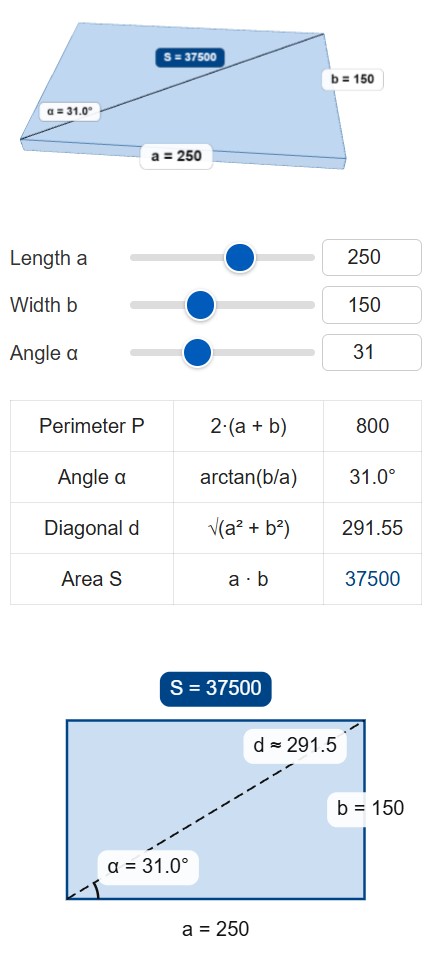
- Length Input: Adjust the first slider to set the primary dimension of the space. For precise requirements, type the exact number directly into the adjacent text field.
- Width Input: Use the second slider or text box to define the secondary dimension. The 3D model instantly scales to reflect the new proportions.
- Angle Adjustment: The angle automatically updates based on the relationship between length and width. Adjusting this specific slider manually will dynamically change the width to maintain geometric rules.
- 3D Viewer: The top viewing box displays a rotating 3D representation of the shape. This highlights the overall footprint and mass of the defined area.
- 2D Blueprint: The bottom viewing area generates a traditional flat schematic. It displays the primary measurements, the diagonal dashed line, and the corner angle.
- Download Button: Clicking the export button captures a high-resolution image of the current calculations and diagrams. This file can be easily emailed to contractors or saved for personal project records.
Practical Example: Planning a Backyard Wooden Deck
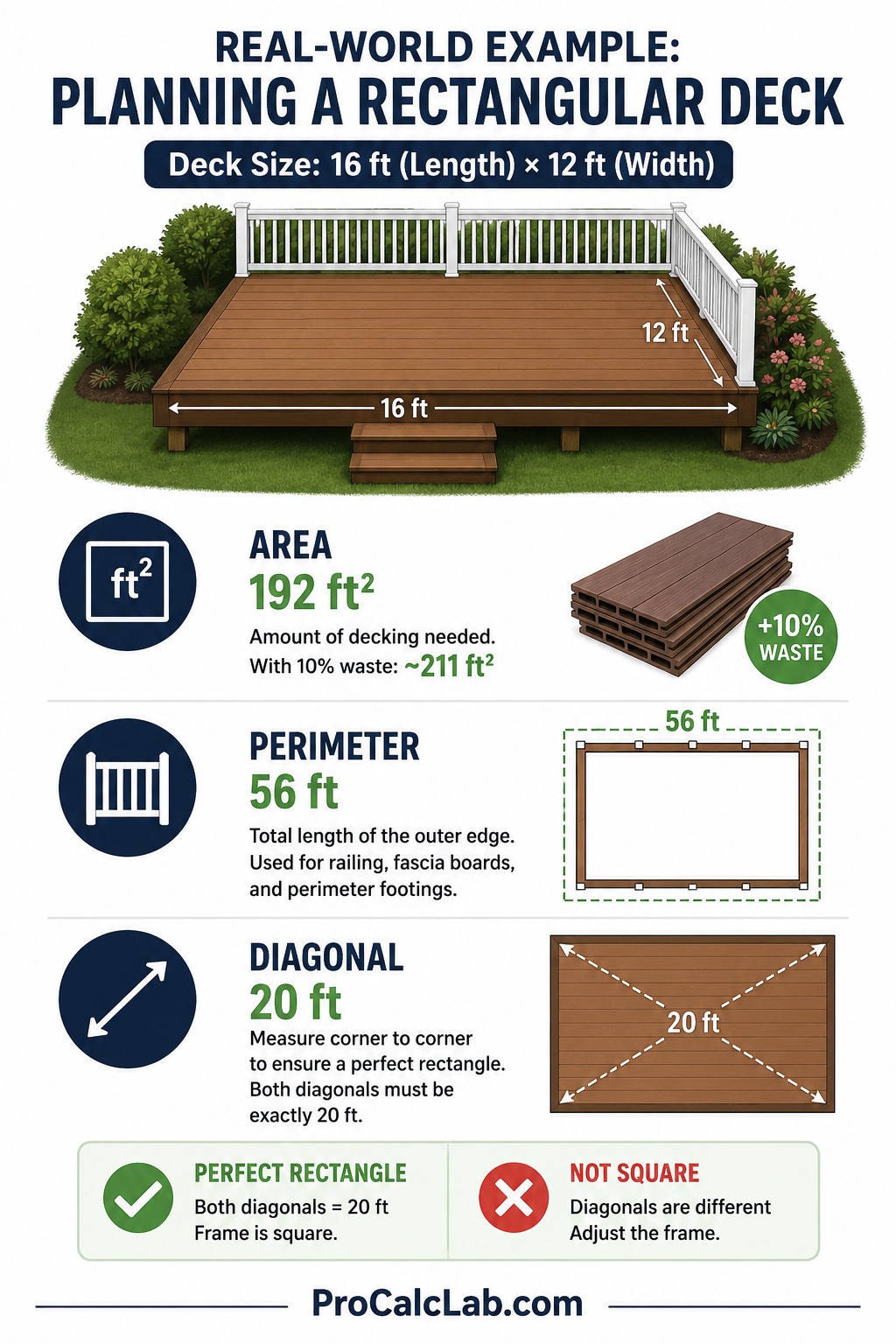
🏡 Looking at a real-world scenario makes the value of these calculations obvious. Imagine planning a new rectangular wooden deck for a backyard. The planned dimensions are 16 feet in length and 12 feet in width. Entering 16 and 12 into the tool yields immediate planning data.
The area calculates to 192 square feet. This number is exactly what is needed to order the correct amount of composite decking boards. Adding a standard waste factor of 10 percent means ordering about 211 square feet of material.
The perimeter calculates to 56 feet. This measurement tells the builder exactly how many linear feet of railing and exterior fascia boards to purchase. It also helps estimate the amount of concrete needed for the perimeter footings.
The diagonal measurement comes out to exactly 20 feet. This is arguably the most critical number for the actual building phase. When framing the outer rim joists, measuring diagonally from corner to opposite corner guarantees a perfect rectangle. If both diagonal measurements read exactly 20 feet, the frame is perfectly square. If one is longer than the other, the frame is skewed and requires adjustment before driving the final structural screws.
Understanding the Core Mathematical Formulas
The application runs on fundamental geometric principles. While the interface handles all the heavy lifting, knowing the math behind the layout is helpful for field verifications. Here are the plain text formulas utilized by the system.
The total surface space is found by multiplying the main sides.
Area = a × b
The total distance around the outside edge is found by adding all four sides together.
Perimeter = 2 × a + 2 × b
The distance between opposing corners relies on the Pythagorean theorem.
Diagonal = √ a2 + b2
The angle of the diagonal line relative to the base requires basic trigonometry.
Angle = arctan b / a
Standard Building Material Dimensions
Knowing the square footage of standard building materials speeds up the estimation process. Once the tool provides the total area of a project, simply divide it by the area of a single material sheet to find the required quantity. The table below outlines common supplies used in residential construction.
| Material Type | Standard Dimensions in inches | Coverage Area in square feet |
|---|---|---|
| Standard Plywood Sheet | 48 × 96 | 32 |
| Standard Drywall Panel | 48 × 96 | 32 |
| Extended Drywall Panel | 48 × 144 | 48 |
| OSB Roof Sheathing | 48 × 96 | 32 |
| MDF Utility Panel | 49 × 97 | 33 |
| Cement Backer Board | 36 × 60 | 15 |
| Rigid Foam Insulation | 48 × 96 | 32 |
| Standard Shipping Pallet | 40 × 48 | 13.3 |
| Steel Concrete Mesh | 42 × 84 | 24.5 |
| Vinyl Siding Panel | 8 × 150 | 8.3 |
| Metal Roofing Sheet | 36 × 144 | 36 |
| Standard Laminate Plank | 7.5 × 48 | 2.5 |
| Acoustic Ceiling Tile | 24 × 48 | 8 |
| Hardwood Flooring Board | 3 × 36 | 0.75 |
| Standard Concrete Paver | 12 × 12 | 1 |
Typical Residential Room Layouts
When drafting floor plans from scratch, establishing appropriate room proportions is critical. Spaces that are too narrow feel cramped, while overly large dimensions waste valuable building budget. The following table provides industry-standard baselines for residential interior spaces. Use these figures as a starting point when dragging the length and width sliders.
| Room Designation | Recommended Dimensions in feet | Total Floor Space in square feet |
|---|---|---|
| Utility Half Bathroom | 5 × 5 | 25 |
| Standard Full Bathroom | 5 × 8 | 40 |
| Primary En-Suite Bath | 8 × 10 | 80 |
| Guest Bedroom | 10 × 12 | 120 |
| Standard Kids Bedroom | 12 × 12 | 144 |
| Primary Suite Bedroom | 14 × 16 | 224 |
| Formal Dining Room | 12 × 14 | 168 |
| Galley Kitchen Layout | 8 × 12 | 96 |
| Open Concept Kitchen | 12 × 16 | 192 |
| Main Living Room | 16 × 20 | 320 |
| Dedicated Home Office | 10 × 10 | 100 |
| Walk-in Wardrobe Closet | 6 × 8 | 48 |
| Dedicated Laundry Room | 6 × 6 | 36 |
| Single Car Garage | 12 × 22 | 264 |
| Double Car Garage | 20 × 22 | 440 |
Common Furniture Footprints for Interior Planning
Calculating the empty area of a room is only half the battle. To ensure a space remains functional, the dimensions of major furniture pieces must be accounted for. Comparing the area of the furniture to the total area of the room dictates traffic flow and usability. Always leave at least 36 inches of walking clearance around major items.
| Furniture Item | Average Dimensions in inches | Required Floor Area in square feet |
|---|---|---|
| Standard Twin Bed | 38 × 75 | 19.8 |
| Standard Full Bed | 54 × 75 | 28.1 |
| Standard Queen Bed | 60 × 80 | 33.3 |
| Standard King Bed | 76 × 80 | 42.2 |
| Three Seat Living Room Sofa | 36 × 84 | 21 |
| Standard Loveseat | 36 × 60 | 15 |
| Rectangular Coffee Table | 24 × 48 | 8 |
| Dining Table for Four People | 36 × 48 | 12 |
| Dining Table for Six People | 36 × 72 | 18 |
| Basic Computer Desk | 24 × 48 | 8 |
| Large Executive Desk | 36 × 72 | 18 |
| Freestanding Kitchen Island | 36 × 60 | 15 |
| Tall Bookshelf Unit | 12 × 36 | 3 |
| Wide Entertainment Center | 18 × 72 | 9 |
Field Applications and Best Practices
The numbers generated by the layout tool apply to nearly every phase of property improvement. During the initial estimation phase, area calculations dictate the purchasing of bulk goods. Flooring contractors rely heavily on square footage. Whether laying down carpet rolls, installing interlocking laminate planks, or spreading thinset for ceramic tiles, exact area measurements prevent costly mid-project supply runs.
Similarly, painters use area calculations to buy the right amount of primer and topcoat. A standard gallon of high-quality interior paint covers roughly 400 square feet. By determining the surface area of a wall using length and height, homeowners avoid buying excessive buckets of expensive paint.
Perimeter numbers are equally vital. In interior trim carpentry, the perimeter dictates the amount of baseboard molding needed to trim out a room. Exterior siding contractors use perimeter measurements to calculate starter strips and drip edges. Landscapers rely on perimeter data to bid on fencing jobs, install garden edging, or run underground irrigation lines around a property border.
The diagonal measurement serves as the ultimate quality control metric. Even if a concrete form has perfectly equal opposite sides, it can still be knocked out of shape into a parallelogram. Measuring the diagonals is the only foolproof way to ensure corners are perfectly square before concrete is poured or floor joists are locked into place. Professional framing crews check the diagonals constantly throughout the workday.
Adding Waste Factors
Calculating the exact mathematical area is just the first step in material ordering. Real-world construction involves cuts, mistakes, and defective materials. It is a mandatory industry practice to order more material than the raw calculations suggest. This buffer is known as the waste factor.
For standard square layouts running straightforward materials like drywall or plywood, adding a 10 % waste factor is standard. Simply multiply the total area by 1.1. For complex layouts involving angled cuts or patterned installations like herringbone tile floors, the waste factor increases to 15 or 20 %. Failing to include a waste factor inevitably leads to running out of materials before the final row is installed.
Literature
- Wagner, J. Modern Carpentry: Essential Skills for the Building Trades. Goodheart-Willcox Publishing.
- Spence, W. Construction Materials, Methods and Techniques. Cengage Learning.
- Mulligan, C. Residential Construction Academy: Basic Principles for Construction. Delmar Cengage.
- Vogt, F. Carpentry. Cengage Learning.
- Huth, M. Basic Principles for Construction: Blueprint Reading. Thomson Delmar Learning.

Markus Fletcher — Structural Design Specialist
Expert in structural integrity, 3D modeling, and applied mathematics. Markus focuses on creating precise tools for construction professionals and DIY engineers.